You have a great concept for a new iPhone application. Your idea is unique, fun and useful, and you are almost certain nothing like it already exists. In fact, your application might be the next Pandora or Instagram.
There is just one tiny problem – you don’t know how to program, let alone make an iPhone app.
You may be ready to dive right into building your app. Don’t. Design and development are just one-step in the path to a successful mobile application.
Whether it’s an iPhone app or an app for Android, Windows or Blackberry, it’s important to take the time to define:
Why you’re building the app
Who will use it
What it will include and how you will build it
When you plan on completing it
This may seem like a waste of time and effort, but attempting to build an app without understanding exactly what, why and how you are creating it, is like driving a car blindfolded. You probably won’t get very far, and you’ll likely look silly doing it.
This article will walk you through how to actually create the app as well as explain the why, who, what, how, and when of app creation.
1. Why and Who
If the only answer you have to the questions, why are you building an app and who will use it is, “Everyone, because it will be awesome!” You have some thinking to do.
Your application should appeal to some audience for some specific reason.
In simpler terms, why would anyone want to use or buy your application? As successful entrepreneur and venture capital mentor Jason Cohen wrote, “If you can’t find ten people who’ll say they’ll buy it, your company is bullsh*t.”
Although this may be a little harsh, it is more than a little true.
Hundreds of thousands of iPhone applications already exist. Unless yours has some special value proposition, no one will download it, and they certainly won’t buy it. The same is true for every mobile environment.
2. What and How
Once you really understand why you are creating your application and for who, the next step is to detail what you will be building and how. You probably have a general idea of what you would like to build. However, to construct an application, you need to know exactly what features your application will support. Understanding who will use your app and what’s important to these users (which you’ve already completed) makes this task much easier. Detailing “the what and how” requires that you:
Define the features your application will support. You should know what every screen will contain and what every button will do and why.
Decide which mobile devices you will support. Sure, you began by wanting to build an iPhone application, but what about iPad, the many flavors of Android and Blackberry, or even Windows mobile devices?
Determine if you will build a web or a native application. Users must download and install native apps, which allows the software to access the mobile devices’ data and features (e.g., the camera). In contrast, mobile web applications require no install and have very limited access to the actual mobile device.
Decide how you will market your application. Mobile development is not a field of dreams; just because you build it, they may not come. There are many choices for publicizing your application’s existence: advertising, hiring a public relations team, content marketing, social campaigns and many more. Determine what’s practical for you.
Determine if and how you will monetize your application. If this application is part of a business, this is a very important step. Selling your app in the Apple store is great, but remember they take 30% of revenue from each sale. If your app costs $1.00, you only see $0.70 from each sale. You can also choose to embed advertising or charge a reoccurring subscription fee. If you want to make money, take the time to define exactly how you will do it.
Decide how you will test the application once it is complete. Testing is critical. Nothing can kill your application’s chance for success quite as fast as pages of bad reviews about buggy software. First impressions are everything, especially when it comes to mobile software. There are several ways to find willing beta testers, pick one (or more).
3. When
Once you have defined what you are going to build, create a development plan. A development plan documents all the decisions you’ve made about what you’re building, your schedule, what tools you’ll use, who else you need (e.g., maybe you need a designer to help you with the screens) and the expected cost. Although they may sound complex, it doesn’t have to be a long stylized document; it can be as simple as bullet points on a white board that you capture with a camera.
A development plan will help you hold yourself accountable and keep you moving toward your goals, while staying on budget.
4. Building the Application
Now that you have created a road map and plan to create the app, it is time to build it. Since you took the time to plan it out, this part will make more sense to either yourself or the developer (if you are outsourcing the actual build). Now’s the time to roll up your sleeves and start building.
Zero-Code Mobile Application Builders
Armed with a clearly defined purpose and roadmap, you are ready to create your mobile application. Although you are non-technical, you have several options.
An entire market of tools exists to create and publish mobile applications without touching a single line of code. This seems promising but, many of these tools are very similar and are limited to implementing simple content driven mobile applications based on a small set of customizable pre-defined templates.
Content driven applications primarily help users find, view and interact with content like a recipe, quiz, picture gallery or news application. Technical journalist Sarah Perez used crowd sourcing to collect a list of over 30 tools in this category after her readers requested options for creating their own mobile apps without programming.
There are also visual tools for building more complex mobile apps, like Cabana. Cabana allows users to build web-based and native mobile applications for iPhone and Android. Cabana is in beta, but you can request an invitation to preview the tool. It may take several weeks to get approval to access the beta version of Cabana, or for US $25.00, you can access the beta immediately.
Cabana allows you to design a user interface (UI) using drag-and-drop components. You can then integrate external services like Instagram or simple functions like a refresh button. Cabana also allows you to connect your application to any third party web service (e.g. an online services that provides weather) using the same visual drag-and-drop approach. Cabana’s ability to connect to third party services provides tremendous flexibility; it makes it possible to incorporate almost any information you desire into your application.
Tiny transmitters that cost a penny to print unveiled
By Zoe KleinmanTechnology reporter, BBC News
The rectennas use smartphone radio waves to communicate.
Researchers in Korea have devised a cheap way of transmitting data from objects to mobile phones when swiped.
They have printed small "rectennas", a cross between an
antenna and an AC/DC current converter, onto plastic foils using
electronic inks.
The rectenna uses radio waves emitted from a smartphone to transmit data to it from a tiny chip.
The printed rectennas cost less than one penny per unit to produce and could be used as an alternative to QR codes.
The technology behind them, Near Field Communication (NFC),
is already used in devices that enable shoppers to make card payments by
touch.
They make their debut in the journal Nanotechnology, published by the Institute of Physics (IoP) this month.
The rectenna is printed using five different electronic inks.
Researchers from Sunchon National University and the Paru
Printed Electronics Research Institute spent four years developing the
printed rectenna.
"What is great about this technique is that we can also print
the digital information onto the rectenna, meaning that everything you
need for wireless communication is in one place," co-author of the study
Gyoujin Cho told the IoP.
"Our advantage over current technology is lower cost, since
we can produce a roll-to-roll printing process with high throughput in
an environmentally friendly manner.
"Furthermore, we can integrate many extra functions without huge extra cost in the printing process." Augmented alternatives
Augmented reality platforms are also providing alternatives to
QR codes, although management consultancy firm Greenwich Consulting
says that in America QR code usage has increased by 40% year on year.
Marketing company Adido says it is now using Aurasma, an
augmented reality application based on visual recognition, rather than
QR codes in its campaigns.
"There are quite a lot of limitations as to what a QR code
can do - you can only make it do one thing at a time, it can only
contain so much data," said Andrew Moore, business development
co-ordinator.
He admitted that when presented with an augmented reality logo, people did not necessarily know what to do with it.
"With QR codes this has also been an issue but now there is a
much more clear course of action. As the AR industry ages that call to
action will also appear."
"What I've found is that people who do download the Augmented
Reality app are proactively active in finding content that is AR-able,"
he said.
Fred Huet from Greenwich Consulting UK also believes that QR codes may have a shelf life.
"The QR scanning process is inherently inconvenient for the
user, compared to other technologies such as Near Field Communication
(NFCs)," he said. "There is a risk of being replaced in the future by
more accessible alternatives."
Ever wonder why the email icon on your computer looks like a postage
stamp or an envelope? Think about it: email has almost made the postage
stamp irrelevant, so why does the icon cling to an antiquated ceremony?
Some
of the research we've been doing at SKD has clarified such seeming
paradoxes and made me wonder how our products and interfaces will take
shape in the years to come. Until recently, many objects have taken cues
from established ceremonies, whether mailing a letter or filing a piece
of paper. Much of this has to do with the sensibilities of a product's
target audience: Digital Immigrants.
Marc Prensky first introduced this segmentation in his paper, "Digital Natives and Digital Immigrants."
Though the paper was written for educators, Prensky's observations are
relevant to designers, whose products must appeal to both Digital
Immigrants--Baby Boomers and anyone over the age of approximately 30 who
has adopted and adapted to digital technology later on in life--and
Digital Natives--those who have grown up with digital technology since
their infancy.
As we've studied people's emotional and behavioral responses to
shifting technologies, I've noticed a divide between Digital Natives and
Digital Immigrants and developed strategies for addressing the needs of
each group.
While it's harder to earn the trust of a Digital Immigrant, it's harder to impress a Digital Native.
Digital Immigrants, who hold the most buying power today, are not
technophobes. Many have smartphones and Facebook accounts, and we
represent a majority of mainstream bloggers. Still, as Prensky points
out, "digital" is a second language for those of us born before
computers and cell phones entered every home. While we have learned the
language and many of us speak it fluently, Digital Immigrants speak with
an Analog accent, detected in behaviors that cling to old world
experiences, like printing and filing emails.
In addition to this Analog accent, I've noticed that Digital
Immigrants carry some heavy baggage from the old world. It shows up in
the form of attachment to existing ceremonies and a subtle distrust of
new things. Bridging this distrust is often done through gradual
evolutions that digitize old experiences while maintaining familiar
reference points. Like the email icon.
Designing for a Digital Native requires a completely different
mindset--one that we need to understand as those in their teens and
twenties gain a louder voice in the marketplace. While it's harder to
earn the trust of a Digital Immigrant, it's harder to impress a Digital
Native. Fast-paced change is the rule rather than the exception for the
generation that grew up immersed in video games, MP3s and a limitless
worldwide web. While you and I may marvel at the multi-tasking ability
of the iPhone or the connective power of LinkedIn, Digital Natives take
this abundance of information for granted.
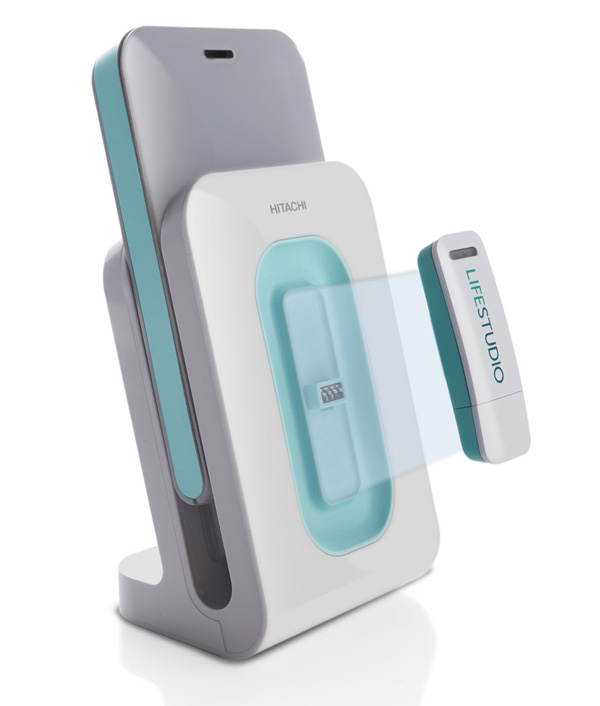
As my team and I developed the LifeStudio family of drives for Hitachi GST--a
product line targeted to these tech-savvy content creators--we compiled
a list of products that have rocked the market by successfully
appealing to Digital Natives.
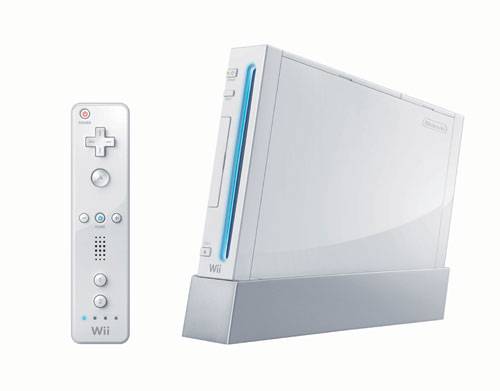
The Nintendo Wii
unapologetically introduces a completely new interface to gamers. The
experience is immersive, interactive, unexpected and it ultimately
delivers on its promise of fun. It's worth noting that the game console
itself fades into the background. Many Digital Natives see their devices
not as prized possessions, but as means to an end. It's about the
experience more than the artifact. Of course, the Wii's sleek white form
doesn't hurt its popularity.
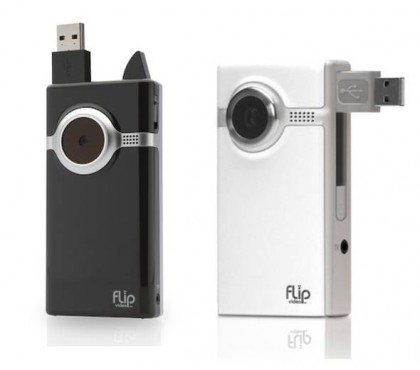
Cisco's Flip Camera puts
the power of a high-definition video camera in a device smaller than
many phones. Many of my younger employees carry it with them every day
in their purses. They especially love the freedom from cords--you don't
have to wait until you get home to your adapter cables to charge the
camera or post and share videos. While the interface is simple and
intuitive, it bears no resemblance to that of traditional video cameras.
It creates easy-to-follow rules for its own game. TiVo puts the power of time- and
content-management in the hands of the viewer in a whole new way. Unlike
a VCR, which records information onto a tape (a familiar experience for
Digital Immigrants, who are more tied to data as an artifact that lives
in a physical structure), TiVo appeals to an audience quite comfortable
with digital information living on a cloud. Even its signature sound
effects depart from traditional analog noises to create a distinct brand
element. TiVo goes one step further with a design language that evokes
attitude and personality.
In designing the LifeStudio drives, we took lessons from these and
other products. First, design for Digital Natives is not defined by an
object, but by an experience. Hardware and software are less
distinguishable to a generation that's grown up with screens
incorporated in their toys. Good design will make digital experiences
more tangible and accessible. Additionally, successful devices help
Digital Natives live their lives better. Not only do they store data or
capture photos better; their function climbs up Maslow's Hierarchy of
Needs, facilitating life goals like creativity, social connection, time
management, and entertainment.
The more I learn about Digital Natives, the more I'm excited about
the design opportunities these young people could spur. They are quick
to embrace new ideas and technologies and need few familiar reference
points to entice them into a new experience. But this does not mean that
they are easy customers. On the contrary, they demand value, relevance,
and innovation. We designers must be up to the challenge as Digital
Natives become the prime demographic.
Novel approach finds lung infection in 500-year-old mummy (2:46)
Aug. 10 - A combination of DNA and protein analysis has been used for
the first time to determine the health of a mummified 15-year-old girl
at the time she died. Scientists say that ''La Doncella'' (The Maiden), a
500-year-old Inca mummy, was suffering from a lung infection and
believe the findings demonstrate the enormous potential of the new
method. Tara Cleary reports.
The same touchy engineers who gave us the first peelable epidermal electronics
last year have a new virtual tactile system: Smart fingers, which could
someday bring a real sense of touch to telepresence applications.
DOST’s enterprise upgrading program fetes pili nut company for technology adoption
Tuesday, 24 July 2012 02:57
J. Emmanuel Pastries, a pili nut processing business which started
out on a Php 500 capital and now a multi-million business, is the very
first Best National adoptor of the Department of Science and
Technology’s (DOST) Small Enterprise Technology Upgrading Program
(SETUP).
SETUP is one of the priority programs of DOST that aims to boost
small and medium enterprises’ (SMEs) productivity and competitiveness
by assisting them in adopting technological innovations to improve
their operations.
When asked about the main ingredients for their success, J. Emmanual
Pastries co-owner Maria Lomibao said that these include “small
capital, perseverance, faith, and DOST.”
Ms.Lomibao was very grateful of the recognition their company got on
top of all the help extended by DOST. “My husband and I are
overwhelmed by DOST’s generosity,” she said, as she accepted the plaque
of recognition.
J. Emmanuel Pastries availed of SETUP in 2003 to acquire additional
equipment for the company. One of the company’s acquisitions was the
gasifier which utilized waste pili shells as fuel for the cooking. The
company was able to solve the problem of accumulating waste from the
pili shells and realized a 50-percent savings from its fuel consumption
with the use of the gasifier, a technology developed by Industrial
Technology Development Institute of DOST.
Aside from the gasifier, the company also acquired roasting machine,
vacuum sealer, oven, foot sealer, extractor, evaporator, bottle
sterilizer, and stainless table. In addition, the company improved its
plant layout and design. Its employees also underwent training
activities on Good Manufacturing Practices (GMP) and Hazard Analysis
and Critical Control Point (HACCP) compliance to ensure the quality of
their products.
Ms.Lomibao shared the ways in which the company benefited from the DOST program.
The sealer is acquired through DOST-SETUP.
Eco Cleaner
Without using regular dish detergents, the Eco Cleaner makes the plates
bright and fresh using ultrasonic waves to ionize food particles on the dishes,
converting the food into reusable compost for plants. Less waste and more
nutrients for plants are a good idea for the future and a solution for
enriching the soil. Of course, we’re talking about the soil for the plants that
you keep in your apartment.
This Sony Eclipse concept created by Hoang M Nguyen and Anh Nguyen is a
media player that uses photovoltaic cells situated on its backside to draw in
solar power. With this player you have a slight change of seeing the battery
low warning very very rare.
It really doesn't matter if your using the cheapest gadgets as long as you are updated with the newest techies in town.
So, looking for a new gadget isn't really that hard with this link below:
http://www.sulit.com.ph/index.php/classifieds+directory/q/cheap+tablet+pc
Modern people love to live life the easiest way..
One click and there they are.
But what is really the most important thing to possess nowadays..?
-->go to the link provided below and dive in the coolest way to buy cameras. http://philipbloom.net/video-dslrs/
Gone are the days that all you have to do through the day is to watch for your favorite TV program and go out with your friends when you find it already boring.
The new gadgets mushroomed the global market. Wherever you go, whatever you do; you use these modern technologies in order to survive a day without getting bored. Now, what's in? iPad? DSLR? iPhone? Well, you should be keen in observing what were the latest gadgets out in the market.
The following are surely the ones which will make you RUN the world!